Showing posts with label Software. Show all posts

Thursday, April 5, 2012

Ashampoo Burning Studio 2012 Free License Key

Ashampoo Burning Studio 11 is a lightweight disc burning application that has an emphasis on being easy to use, yet also still manages to include some interesting and unusual features.

When you need to burn a data disc, for instance, it's all very straightforward. Just click "Burn Files and Folders" from the simple front-end menu, drag and drop the required files onto the program, and it'll be burning them to CD, DVD or Blu-ray in a couple of clicks.


But if you need a little more, the program also allows you to create Autostart discs, which include interactive multi-page menus which appear when the disc is inserted. These can launch files or documents on the disc, open a folder, link to a web page and more, and are a perfect way to help the recipient of your disc understand exactly what you've provided for them.

Similarly, Burning Studio 11 can create simple video DVDs, just like most of the competition: drag and drop in your source movie clips, then burn them to DVD in a clip or two. But again, that's just the start. The program includes a video editor, supports customising your menus, and minimises encoding hassles by automatically adjusting the video quality (if necessary) to ensure everything fits on the disc.

You're also able to quickly rip CDs, or create an MP3 or WMA CD, DVD or Blu-ray disc. The program can create and use all the major disc image formats (ISO, CUE/BIN, ASHDISC). There's support for all the standard features like copying discs, erasing rewriteable discs, and extras include a simple backup tool and a designer to help create covers, labels and booklets.

And this new build extends Burning Studio with many powerful new features.

It's now easy to add files to projects directly from your smartphone, digital camera, or Facebook, Dropbox, Picasa or Flickr accounts, for instance.

A new Compact Mode makes it even quicker and easier to create your disc projects.

The program can now burn many common audio playlist formats, and normalise the volume of MP3 and WMA CDs. You can browse disc images to see exactly what they contain. And new multi-core support ensures all this happens faster than ever.

 Get Free License Key Ashampoo Burning Studio 2012 :

1. Visit the Ashampoo Burning Studio 2012 Computer Bild Giveaway Page and download Ashampoo Burning Studio 2010 Advanced installer.


2. After you have finished downloading, just install it. The installation is in German language. But after installation, you can choose the language you would like to use. Also take note that during installation, Ashampoo tries to install Ashampoo toolbar, change your homepage, etc. Make sure to uncheck them  if you don’t want the toolbar.


0 comments

TuneUp Utilities 2011 Free Product License Serial Code

PC tune-up tools are a dubious proposition. Often they make no measurable difference to performance, and when they do help it’s chiefly by removing services and startup items, which can be done without special software.

Yet TuneUp’s latest suite has a few unique tricks. For one, rather than uninstalling an application, TuneUp lets you temporarily deactivate it. Associated background services are disabled, reducing the load on your system, but when you launch the application they’re automatically re-enabled. This could be a big help on overloaded systems, but annoyingly it’s only a one-shot setting. Once you’ve finished using a program you have to go back into the TuneUp interface and manually deactivate it again.


TuneUp deserves credit for the multiple fresh ideas in this package, but we still have reservations. Turbo Mode and the Program Deactivator give you more flexibility than the old-fashioned approach of simply removing programs and services from your system, but it’s tiresome to have to switch modes to use certain programs and re-deactivate heavy applications after each use.

In light of that compromise, the price feels high, even though it does cover three machines. Still, if you have one or more systems that are seriously overloaded, and removing applications and services isn’t an option, this is one of very few tools we’ve seen that could actually help.

Get product key for TuneUp Utilities 2011 Free:

Go to giveaway page


  • Enter your e-mail address and submit the form
  • They will send you an e-mail containing an activation link
  • Your personal product key is displayed together with the download information

 The product key given this time is valid for 9 months only, there will no free upgrade for this giveaway version either.


0 comments

Saturday, March 31, 2012

Protect or Deny Access to your USB Drives

The most common removable device through which viruses spreads into Computers these days is Pen drive or USB flash drive, Windows Autorun gives the possibility for these viruses to easily enter into users Computers which is not a surprise- that’s why it is recommended to disable autorun functionality in Windows for removable drives. There are several freeware portable utilities available on internet to write protect USB drives and further prevent autorun viruses execution, meet USB Disk Manager, a freeware utility offers more than what you want to control your USB drives and protect your system from viruses in it.

Disabling Autorun in Windows is a step forward in stopping these devices trying to infect a machine as soon as it gets plugged in. Along with the security aspect, there are many times when you just don’t want anything on the USB drive to be deleted, moved or even executed. There are some sticks that come with a write lock but you pay a premium for the function. Using an SD card with a lock and an adapter is also an option which is what I use myself when needing to transfer files to another computer.

There is a small utility that can write protect any USB storage devices when plugged into your PC so there can’t be any unauthorised access. The program is called USB Disk Manager and along with write protecting your drive, has a few more features that may be useful if you want more protection from USB threats.

Other things it is able to do include blocking any executable file running itself from the USB device, meaning no virus that spreads itself this way can run. Another feature is being able to completely block read or write access on USB removable disks so any kind of file transfer is not possible.

The program is portable so simply download and extract it to your chosen location, and open the USB Disk Manager.exe (you may have to right click and ‘Run as Administrator’). If the program has not popped its window into view, click on the icon in the system tray.

Write Protect USB Drives with USB Disk Manager

You can turn on write protection for removable disks where you can restrict the applications to only read files from the pen drives. You can turn write protection off from USB Disk Manager preferences.


Deny Software execution from USB drives

You can able to prevent spread of viruses though USB disks by selecting ‘software execution Denied “option from the program window (by default Software execution is Allowed option is set) so that no application or program doesn’t run from the device.


Disable /enable USB removable disks: you can disable all your flash drives to disallow read and write on the USB removal disks, enabling this setting also prevents the transfer of files to and from the USB drive to your system.

USB Disk Manager offers read and write protection to the USB drive that is connected to the system that’s running the program, what if you want these features for USB drives when connected to systems in cybercafé or in your friend’s house, USBDM offers option to “automatically copy this application to USB disks as Autorun in its settings which you can enable and this program will be autorun on new machine.


After enabling any above of the options you may need to reconnect your pen drive or restart your System for changes to take effect.

USB Disk Manager is compatible with XP, Vista and 7 32 & 64bit
Website

Download
0 comments

Thursday, March 22, 2012

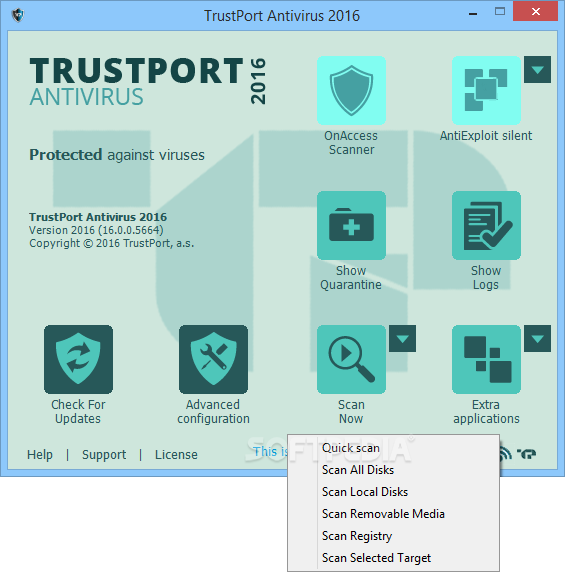
TrustPort Antivirus free 1 year

 TrustPort Antivirus is a compact software solution for computer security against harmful codes, spam, fraudulent websites and other risks. At all entry points of the computer, it provides antivirus, antispyware, antiadware protection. It controls incoming mail, it checks web pages and documents, and it automatically offers scanning of a removable drive when connected. 


Data in the computer are scanned in two ways; files are either scanned automatically on access or manually on demand. It is possible to plan regular scanning of selected disks or folders and regular updates of virus patterns. The solution is based on an effective combination of multiple scanning engines.

Parental lock enables blocking of web pages not suitable for children and youth. It is possible to select categories of web pages that should not be open, for example with pornographic or violent content.

Antiphishing module prevents the users from opening a fraudulent web site, aimed at luring out sensitive personal data. In comparison with previous versions, TrustPort Antivirus 2011 has a more current graphical user interface and neat new icons. In addition to the default skin, the user can choose from hundreds of other skins, available for free on the internet. The solution can be used in two operating modes, for beginners or for advanced users.

Users working on more workstations will appreciate option of creating portable antivirus protection on a flash disk. For the rare case of fatal operation system failure, it is possible to prepare a recovery disk in advance. With Trustport Antivirus you can keep your computer safe from any intruder attacks.


The latest information from TrustPort "Let’s go GLOBAL with TrustPort! We are giving away free licenses. The first three fans from any country will be given a 1yr license of TrustPort Antivirus. Simply tell us the name of your country and be amongst the first three! Let’s see if we can truly go global and reach every country on our planet"


Step 1:

Go to the TrustPort Facebook page and click Like button
Step 2:

Post the name of your country on the wall (you can also read previous comments before, there are not all countries of the world.

 Results:


0 comments

AT&T update Android 4.0 to HTC Vivid

 AT&T announced today that it is making the Android 4.0 Ice Cream Sandwich update available for the HTC Vivid smartphone, making it the first carrier in the US to issue an ICS upgrade on a device that originally shipped with Android 2.3 Gingerbread. HTC Vivid customers can also expect new Beats by Dr. Dre audio enhancement and an upgrade to HTC Sense 3.6.


This makes the HTC Vivid the first US smartphone to receive the ICS upgrade from Gingerbread. Other AT&T devices to follow include the LG Nitro, Motorola ATRIX 2, Motorola ATRIX 4G, Pantech Burst, Pantech Element, Samsung Captivate Glide, Samsung Galaxy Note, Samsung Galaxy S II, Samsung Galaxy S II Skyrocket, and the Samsung Galaxy Tab 8.9. The update will be rolled out to these devices in the coming months.

HTC Vivid as one of the first handsets in the United States to see an Ice Cream Sandwich update after launch, the Vivid also benefits from HTC's Sense 3.6 user interface and Beats Audio enhancement. Additional details include added Bluetooth options, general UI improvements, face unlock, and better e-mail and Exchange support.

Anyone using a Vivid  can manually install the update immediately. Keep in mind, though, that your phone should have at least 50 percent battery life before getting started. If you need help, both AT&T and HTC are providing assistance in regard to the features and installation.
0 comments

Windows 8 supports Retina-class displays

All the talk these days is of the new iPad and its magical screen. Apple isn’t the only one who can do that, you know. In fact, most display makers are looking forward to post-HD resolutions as one of the big selling points of the next generation of displays. Other tablets are already approaching iPad levels of pixel density and it would be foolish of the likes of Google and Microsoft not to be planning for it.

Fortunately, Microsoft is well aware of the trend and has plans in place for dealing with pixel-dense displays (or “Retina” to the vulgar).

The specifics are laid out with no quarter given to laymen in this post at Building Windows 8. The gist is that they have analyzed the expected range of display sizes and resolutions, and have identified a sort of “Goldilocks Zone” for the three general classes of resolutions: standard, HD, and quad-XGA (2560×1440). Inside this zone, text and UI elements aren’t blown up to cartoonish proportions or shrunk down to a size that’s frustrating to touch.


Microsoft have come up with the following

    * In the first case (Standard), buttons and text will be shown with no scaling.
    * In the second case (HD), they’ll be 140% normal size (i.e. elements 100 pixels wide will become 140),
    * For the third case (Quad-XGA) they’ll be blown up by 180%.

There is an alternative solution which is known as “independent continual resize” and that would render every button and character the same size regardless of the size or resolution of the display. However the way that we currently store and render text means that this advanced solution just isn’t possible at this point in time. Perhaps in the future it will be possible but for now it isn’t practical.


As you can see from the screenshot above, the different resolutions can change the way the user will view an app dramatically, which is why it’s so tricky scaling and re-sizing programs for different displays.

Because of the increasing size of resolutions, it’s starting to make traditional UI features like drop down menus cumbersome and unpractical. They end up being far too small to use accurately with touch. That’s why Microsoft have brought in an array of touch gestures with Windows 8 to try alleviate this problem.

Microsoft talk in great detail about this issue and how they’ve worked hard developing good solutions for Windows 8 over on their blog, so if you’re interested in going into more technical details feel free to check it out.

0 comments